
Table of Contents
Innovex Ventures LLC has recovered dozens of WordPress sites broken by a single plugin update applied without testing. It’s the most preventable cause of site downtime — and AI update management eliminates it entirely. This is the complete guide to how AI handles WordPress updates safely, at scale, without human intervention. AI WordPress Update Management.
Why Do WordPress Plugin Updates Break Sites?
WordPress plugin updates break sites because plugins are developed independently — each author writes code against their own dependencies without guaranteed compatibility with every other plugin, theme, or WordPress core version running on your specific site. When two plugins share a function name, use conflicting JavaScript libraries, or update their database schema in incompatible ways, the result is a white screen, a broken layout, or a crashed admin panel. The average WordPress site runs 22 plugins — the probability of a conflict on any given update cycle is not zero. It’s a certainty over time.
What Is AI Update Management for WordPress?
AI update management for WordPress is an automated system that creates a complete staging clone of your live site, applies all pending updates to the clone, runs a battery of functional and visual tests, and deploys to production only when all tests pass — rolling back automatically if any test fails. The entire process runs on a schedule without human involvement, and results are reported after each cycle so you have a full audit trail of what was updated, what was tested, and what the outcome was.
How Does Staging-Based Update Management Work?
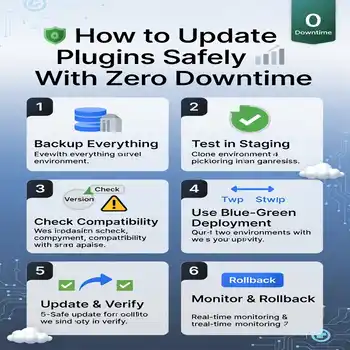
Staging-based update management works in four stages. First, the AI system creates a complete clone of your live site — files, database, and all — in an isolated staging environment. Second, all pending updates (core, themes, plugins) are applied to the staging clone, not the live site. Third, the system runs automated tests: functional checks (can users register, can forms submit, does checkout work), visual regression (do pages look correct), and performance checks (do Core Web Vitals remain within acceptable thresholds). Fourth, if all tests pass, updates are pushed to production; if any test fails, the staging environment is rolled back and the conflict is flagged for review.
The staging clone is disposable — it’s created fresh for each update cycle and destroyed after. This means every test runs against an exact replica of your current live site, not a static snapshot that drifts over time. The accuracy of staging-based testing is dramatically higher than testing against a permanent staging environment that accumulates configuration differences from production.
What Tests Does AI Run After a WordPress Update?
AI update management systems run three categories of tests after applying WordPress updates. Functional tests verify that key site operations still work — login, registration, contact form submission, e-commerce checkout, search, and any custom functionality specific to the site. Visual regression tests compare screenshots of key pages against a pre-update baseline, flagging pixel-level differences that indicate layout breakage or CSS conflicts. Performance tests measure page load time, Time to First Byte (TTFB), and Core Web Vitals scores to ensure updates haven’t introduced performance regressions.
Advanced systems add one more layer: database integrity checks. Some plugin updates modify database table schemas — the AI verifies that schema changes completed correctly and that no data was corrupted during the update process. For e-commerce sites and membership sites where customer data lives in the database, this check is non-negotiable.
How Does Automatic Rollback Work When an Update Fails?
Automatic rollback works by restoring the staging environment to its pre-update state when any test fails — discarding the failed updates entirely and leaving the live site untouched. Because staging-based AI management applies updates to the clone before touching production, the live site is never at risk. The rollback is instantaneous — a database restore from the pre-update snapshot — and the system generates a conflict report identifying which update caused the failure and what test it failed.
The conflict report is the key output from a failed update cycle. It tells you exactly which plugin or combination of plugins is incompatible, what the failure mode was (functional, visual, or performance), and what your options are — delay the update, test plugins individually to isolate the conflict, or engage a developer to resolve the underlying incompatibility. AI maintenance turns a mysterious broken site into a documented, diagnosable conflict.
What Tools Does Innovex Use for AI WordPress Update Management?
Innovex Ventures deploys a combination of tools for AI WordPress update management depending on site complexity and hosting environment. For managed hosting environments, we use WP Umbrella and MainWP with AI-enhanced testing workflows for staging clone creation, update deployment, and automated rollback. For high-complexity sites with custom functionality, we deploy custom testing pipelines using Playwright for functional and visual regression testing integrated with the update management workflow. Every tool combination is configured specifically for the client site — not a generic one-size setup that misses site-specific critical paths.
For the complete AI maintenance stack that AI update management is part of, read the AI Powered Website Maintenance pillar guide →. To discuss AI update management for your specific WordPress site, book a free consultation with Innovex Ventures →
Frequently Asked Questions — AI WordPress Update Management
How often should WordPress plugins be updated?
WordPress plugins should be updated as soon as updates are available — especially security updates, which patch known vulnerabilities that hackers actively exploit. With AI update management, updates are tested and deployed automatically on a weekly schedule, so your site is always running the latest secure versions without manual intervention or risk of untested updates breaking the live site.
Can AI update management handle WooCommerce sites?
Yes. WooCommerce sites are actually where AI update management delivers the highest value — a broken checkout from a failed WooCommerce or payment gateway update directly costs revenue every minute it’s down. AI update management validates the complete checkout flow as part of its functional test suite before any WooCommerce-related update goes to production.
What happens if an update breaks the site after deployment?
If an issue appears after deployment that testing didn’t catch — an edge case on a specific device or browser, for example — AI maintenance systems detect the issue through continuous monitoring (uptime checks, error rate spikes, performance degradation) and can trigger an automatic rollback to the pre-update backup. Most post-deployment issues are detected and resolved within minutes.
AI in WordPress sounds interesting. How do you think it will change the way we manage updates?
Not, much. but much better at doing the analysation and error detection.