Choosing the right marketing automation tools SMB doesn’t mean picking the fanciest platform. Most small businesses need four or five tools that connect cleanly and won’t require a developer to maintain. This guide covers the best marketing automation tools for SMB growth—what we actually use for our clients, what each tool does, when to use the free tier, and what to skip entirely.
This is part of the AI Marketing Automation for SMBs: The Complete System series.
Table of Contents
Best Marketing Automation Tools for SMBs: Organized by Function
Email Automation + CRM
Brevo (formerly Sendinblue) — Best free tier in the category. Free up to 300 emails/day, unlimited contacts, automation workflows, and a basic CRM. The free tier covers most SMBs through their first 500 leads. Paid plans start at $25/month and add more automation steps, A/B testing, and advanced segmentation. We use Brevo as the primary email and automation platform for all Innovex clients because it handles the entire marketing automation workflow without requiring integrations.
FluentCRM — WordPress-native CRM plugin. One-time price (~$129/year), unlimited contacts, email sequences, and deep integration with WooCommerce, LatePoint, and WPForms. Best for SMBs that want their CRM inside WordPress and don’t want a monthly SaaS bill. Pairs with FluentSMTP for deliverability. Perfect for agencies already managing WordPress sites for clients.
When to use which: Brevo for simplicity and cross-platform use. FluentCRM if you’re WordPress-first and want to own your data locally without external dependencies.
Lead Capture
WPForms Lite — Free, connects to Brevo and most CRMs via addon or Zapier. Sufficient for basic lead capture forms. Pro version ($49/year) adds conditional logic and payment fields. For SMBs running WordPress sites, WPForms is one of the best marketing automation tools because it captures leads directly into your CRM workflow.
Fluent Forms — More powerful free tier than WPForms. Native FluentCRM integration. Better for complex conditional forms and multi-step flows. Free for most use cases. An excellent choice if you’re building advanced marketing automation funnels on WordPress.
AI Integration
Easy MCP AI Connector — WordPress plugin that connects Claude directly to your WordPress site via MCP. Enables AI-powered content creation, post publishing, SEO updates, and site management through chat. This is the tool that makes AI content delivery possible without manual publishing, turning your marketing automation tools into a fully autonomous system.
AI Engine (Jordy Meow) — WordPress AI plugin supporting multiple models. Good for on-site chatbots, content generation, and AI-assisted moderation. Pairs well with Easy MCP AI for a full AI stack. See independent reviews on G2 for comparison against other marketing automation AI tools.
Campaign Automation
Google Ads — Smart bidding + audience lists built from CRM data (Customer Match). Connect your CRM contact list to Google Ads to suppress existing clients, build lookalike audiences, and feed conversion data back for algorithmic optimization. This ties your email marketing automation tools directly to paid acquisition.
Meta Ads Manager — Custom audiences from CRM data via CSV upload or Meta pixel events. Same principle as Google: your CRM data improves your targeting, and your ad conversions improve your CRM data. An essential piece of the marketing automation stack for SMBs running social media campaigns.
Booking + Calendar
LatePoint — WordPress booking plugin. Connects to FluentCRM natively. Booking → CRM contact creation → sequence trigger. The self-booking link in your nurture sequence should point here. One of the most underrated marketing automation tools because it closes the loop between lead capture and conversion.
Calendly (free tier) — Better for non-WordPress or when you need external calendar integration. Free tier covers one event type — enough for a strategy call booking link. Simple but effective for SMBs that aren’t WordPress-first.
Reporting
Google Looker Studio (free) — Connect Google Analytics, Google Ads, and Search Console into a single automated dashboard. Reports refresh daily without manual pulling. Share with clients or stakeholders as a live link. See Google’s official guide to reporting in Looker Studio for setup details.
Brevo Analytics — Built-in email performance reporting. Open rates, click rates, sequence performance, list growth. Sufficient for email-focused reporting without an external tool.
What Marketing Automation Tools to Avoid for SMBs
HubSpot free tier — The CRM is genuinely free and powerful, but the automation features are paywalled behind expensive plans ($45–$800/month). You’ll build your system on free features and then hit walls when you try to automate anything meaningful. Not a good choice for budget-conscious SMBs.
ActiveCampaign — Excellent tool, but $49–$149/month for SMB tiers. Overkill unless you’re running complex multi-branch sequences at volume. Start with Brevo and migrate only if you outgrow it.
Zapier (heavy use) — Useful for connecting tools that don’t have native integrations. But if your marketing automation stack requires Zapier for every connection, you’ve built a fragile system. Prefer native integrations where they exist—they’re faster, more reliable, and require less maintenance.
The Minimum Viable Marketing Automation Stack for SMBs
If you’re starting from zero and want the lowest-cost path to a working automation system that actually drives revenue:
- Brevo (free) — email + CRM + automation
- Fluent Forms (free) — lead capture connected to Brevo
- Calendly (free) — booking link in your sequences
- Google Looker Studio (free) — reporting
Total monthly cost: $0. You can build a complete lead capture → nurture → booking system using these marketing automation tools before spending a dollar. This is exactly how we help SMBs launch their first campaigns.
Making Your Marketing Automation Tools SMB Work Together
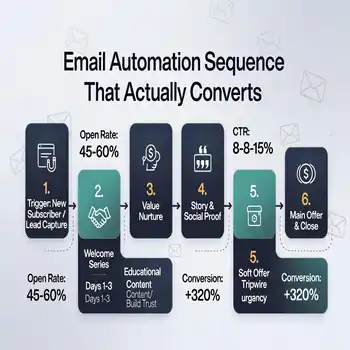
The best marketing automation tools for SMBs aren’t the most expensive—they’re the ones that connect. Your lead capture form should feed into your CRM. Your CRM sequences should send people to your booking calendar. Your booking calendar should create a new contact and trigger a welcome sequence.
That integration is what separates a marketing automation stack that works from a collection of disconnected platforms.
Ready to build this system for your SMB? Book a free Automation Audit →