Table of Contents
WordPress is the most attacked CMS on the internet — not because it’s inherently insecure, but because its market dominance makes it the highest-value target. 90,000 WordPress sites are attacked every minute. The difference between sites that get compromised and sites that don’t is almost always the quality of their security monitoring. AI WordPress Security Monitoring closes the gap that traditional scheduled scans leave wide open.
What Is AI Security Monitoring for WordPress?
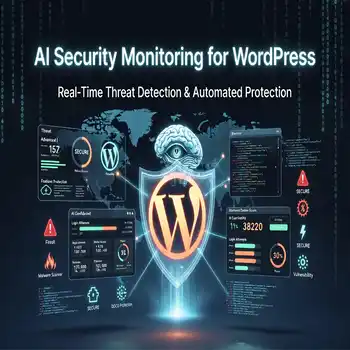
AI security monitoring for WordPress is a continuous, real-time threat detection and response system that uses machine learning to establish a baseline of normal site behavior, then identifies and responds to deviations from that baseline — unauthorized file changes, unusual login patterns, traffic anomalies, malware signatures — in seconds rather than hours. Unlike traditional security plugins that scan on a schedule, AI monitoring never stops watching.
What Are the Most Common WordPress Security Threats in 2026?
The most common WordPress security threats in 2026 are brute force login attacks, plugin vulnerabilities exploited before patches are applied, SQL injection through vulnerable form inputs, cross-site scripting (XSS) via malicious content injection, and supply chain attacks through compromised plugin repositories. Of these, plugin vulnerabilities and brute force attacks account for over 70% of successful WordPress compromises. Both are preventable — plugin vulnerabilities through immediate patching (handled by AI update management) and brute force through real-time login monitoring and IP blocking.
How Does AI Detect Security Threats Faster Than Traditional Tools?
AI detects security threats faster than traditional tools by monitoring continuously rather than scanning periodically. A traditional security plugin runs a file integrity scan every hour at best — meaning a malware injection that occurred one minute after the last scan goes undetected for 59 minutes. An AI monitoring system detects the file change within seconds of it occurring, because it watches the file system in real time rather than comparing snapshots on a timer.
Beyond speed, AI detection is more accurate. Traditional pattern-matching tools flag threats based on known malware signatures — they miss novel attacks. AI systems trained on behavioral data recognize anomalous patterns even from previously unseen attack vectors: a login attempt sequence that doesn’t match any human behavior pattern, a file modification that changes only a few bytes in a location attackers commonly use for backdoors, a traffic spike originating from a botnet IP range that hasn’t been flagged yet. Behavioral detection catches what signature detection misses.
What Does AI Do When It Detects a WordPress Security Threat?
When AI detects a WordPress security threat, the response is immediate and layered. For brute force attacks: the attacking IP is blocked at the firewall level within seconds, login attempts from that IP cease, and the event is logged with full context — IP, geolocation, targeted username, time, and frequency. For malware detection: the affected file is quarantined (moved out of the web root so it can’t execute), the site owner is alerted with the exact file path and nature of the change, and a clean version is restored from the integrity baseline. For traffic anomalies: rate limiting engages automatically, protecting server resources while the AI analyzes whether the traffic represents a DDoS attack, a scraping bot, or legitimate traffic spikes.
What Is File Integrity Monitoring and Why Is It Critical for WordPress?
File integrity monitoring is the continuous tracking of every file on your WordPress installation — core files, theme files, plugin files, and uploads — to detect unauthorized additions, modifications, or deletions. It’s critical for WordPress because attackers who gain access almost always modify files to establish persistence: injecting malicious code into theme functions, adding backdoor PHP scripts to the uploads directory, or modifying core WordPress files to execute attacker-controlled code on every page load.
AI file integrity monitoring establishes a cryptographic hash of every file at a known-clean baseline, then continuously compares live file hashes against the baseline. Any deviation triggers an immediate alert and automated quarantine response. The system also distinguishes between legitimate file changes (a plugin update, a new upload) and suspicious ones (a file modified without a corresponding update event) — dramatically reducing false positives compared to naive hash comparison.
How Does Innovex Ventures Implement AI Security Monitoring?
Innovex Ventures deploys a multi-layer AI security monitoring stack for client WordPress sites: real-time file integrity monitoring, continuous login attempt analysis with automatic IP blocking, traffic anomaly detection at the CDN and server level, and daily malware scanning against an AI-enhanced signature database that updates in real time as new threats are identified. Security events are logged, reviewed, and summarized in monthly security reports so clients have full visibility into their threat landscape.
For the complete AI maintenance framework this security monitoring is part of, read the AI Powered Website Maintenance pillar guide →. To secure your WordPress site with AI monitoring, book a free consultation →
Frequently Asked Questions — AI WordPress Security Monitoring
How do I know if my WordPress site has been hacked?
Signs your WordPress site has been hacked include: unexpected admin user accounts, modified files with unknown code, your site redirecting visitors to other URLs, Google Search Console warnings about malware, your hosting provider suspending your account, or site visitors reporting antivirus warnings. With AI security monitoring, most of these events are detected and blocked before they become visible symptoms — but if you’re seeing these signs without monitoring in place, you need an immediate security audit.
Is Wordfence or Sucuri as good as AI security monitoring?
Wordfence and Sucuri are solid traditional security tools — they provide signature-based malware scanning, firewall protection, and login security. AI security monitoring goes further: continuous behavioral analysis, real-time file integrity monitoring, and anomaly detection that catches threats that haven’t been added to signature databases yet. For most business WordPress sites, the combination of a traditional firewall (Wordfence or Sucuri) with AI behavioral monitoring provides the strongest coverage.
How long does it take to clean a hacked WordPress site?
Cleaning a hacked WordPress site typically takes 4 to 12 hours of professional work — identifying the infection vector, removing all malicious code, restoring clean files, hardening the site against re-infection, and submitting for Google’s malware review if the site was blacklisted. With AI security monitoring in place, most intrusions are detected and quarantined within seconds — before the infection establishes persistence and requires full remediation.
AI WordPress Security Monitoring
Social Media: Linkendin->, Facebook->