A site can pass every functional test — forms submit, checkout works, login succeeds — and still be visually broken for real users. A navigation menu that collapsed behind a hero image. A CTA button that shifted off-screen on mobile. A font that reverted to Times New Roman after a theme update. These are the breakages that functional testing misses and users find. AI Visual Regression Testing WordPress catches them automatically, before anyone outside your organization sees them.
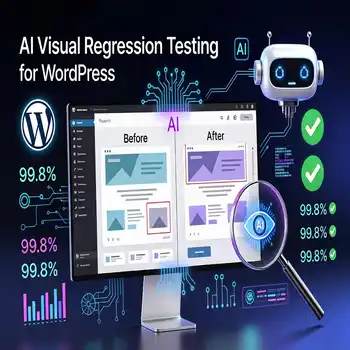
Table of Contents
What Is Visual Regression Testing?
Visual regression testing is the automated process of capturing screenshots of your website’s pages at a defined point in time, then comparing those screenshots against new captures taken after changes — updates, deployments, content edits — to identify visual differences. Any difference outside an acceptable threshold triggers an alert. The goal is to catch visual breakage before it reaches users, not after a customer reports it.
Why Do WordPress Sites Need Visual Regression Testing After Updates?
WordPress sites need visual regression testing after updates because CSS conflicts between plugins and themes are one of the most common — and most invisible — consequences of updates. When Plugin A and Plugin B both load stylesheets that define the same CSS class differently, the result is a visual conflict that has zero impact on site functionality but makes pages look broken or unprofessional to real users. Functional tests confirm that a form submits — they don’t confirm that the form is still visible and correctly positioned above the fold on a 375px iPhone screen.
The stakes scale with the complexity of your site. A simple brochure site might have 5 key pages to test. A WooCommerce store might have 50 — product pages, category pages, cart, checkout, account pages, confirmation pages, each at three viewport sizes. Manual visual review of all 150 page-viewport combinations after every update is not realistic. AI visual regression testing makes it automatic.
How Does AI Visual Regression Testing Work?
AI visual regression testing works in three stages. First, a baseline is established — the AI tool captures screenshots of every specified page at every specified viewport (desktop, tablet, mobile) when the site is in a known-good state. Second, after every update or deployment, the tool recaptures screenshots of the same pages at the same viewports. Third, the AI compares the new screenshots against the baseline using computer vision algorithms, identifies differences, classifies them as meaningful (a layout shift, a missing element, a color change) or trivial (an animated element in a different frame, dynamic content that legitimately changes), and generates a report flagging only the meaningful differences.
The AI classification layer is what separates modern visual regression tools from naive pixel-comparison tools. Pixel comparison flags every single difference — including a slider image that changed, a “last updated” timestamp that incremented, or a stock ticker that moved. AI classification understands context: a change in a known dynamic content area is expected; a change in the navigation bar after a CSS update is a regression. This distinction is what makes AI visual regression testing actionable rather than noise-generating.
Which Pages Should Be Included in Visual Regression Testing?
Visual regression testing should cover every page that directly impacts user experience and conversion — prioritized by business impact. For most WordPress sites, the essential test suite includes: homepage, primary service or product pages, contact page, about page, blog index, a sample blog post, and any conversion-critical pages (checkout, booking, quote request). For WooCommerce sites, add: shop page, product page, cart, checkout steps, and order confirmation. For membership sites: login, registration, and member dashboard.
Each page should be tested at minimum at three viewports: 1440px (desktop), 768px (tablet), and 375px (mobile). For sites where mobile traffic exceeds 60% of sessions — which is most business sites in 2026 — mobile testing is the highest priority. A broken mobile layout costs more revenue per hour than a broken desktop layout by the same proportion as your mobile traffic share.
What Tools Does Innovex Use for AI Visual Regression Testing?
Innovex Ventures uses Playwright with Percy or Chromatic for visual regression testing, integrated into the update management pipeline so visual tests run automatically after every staged update before production deployment. For high-volume sites, we deploy BackstopJS configured with AI-enhanced comparison algorithms that minimize false positives from dynamic content. Every visual regression test is run at three viewport sizes, results are captured and stored with full diffs, and any flagged regression blocks production deployment pending review.
For the complete AI maintenance framework, read the AI Powered Website Maintenance pillar guide →. To add visual regression testing to your WordPress maintenance stack, book a consultation with Innovex Ventures →
Frequently Asked Questions — AI Visual Regression Testing for WordPress
How is visual regression testing different from manual QA?
Manual QA requires a human to visually review pages after every update — time-consuming, inconsistent, and impossible to scale across dozens of pages and viewports. Visual regression testing automates the comparison, runs consistently on every update, covers every specified page at every specified viewport simultaneously, and produces a documented diff report rather than relying on human memory of what the site looked like before the update.
Can visual regression testing replace manual testing entirely?
Visual regression testing replaces the bulk of manual visual QA but doesn’t replace all manual testing. It excels at detecting unintended visual changes after updates. It doesn’t test user journeys, interaction states (hover effects, form validation messages, modal dialogs), or complex multi-step flows — those require functional testing tools. The optimal testing stack combines visual regression testing with functional automated tests and targeted manual review of new features.
How often should visual regression tests run on a WordPress site?
Visual regression tests should run after every update deployment — which in an AI update management workflow means automatically after every staged update cycle. For sites with frequent content changes, a weekly baseline refresh ensures the comparison stays accurate as legitimate content evolves. For sites on a stable content schedule, monthly baseline updates are sufficient.
AI Visual Regression Testing WordPress
Social media: Facebook->, Linkedin->