Most SMB CRMs are graveyards. Contacts imported once, never updated, stages that haven’t moved in months, follow-up tasks that were supposed to fire automatically and never did. The CRM becomes a report card for dead leads instead of a live pipeline tool. CRM automation small business.
CRM automation fixes this — not by adding complexity, but by removing the manual steps that nobody actually does consistently.
This is part of the AI Marketing Automation for SMBs: The Complete System series.
Table of Contents
What CRM Automation Actually Means
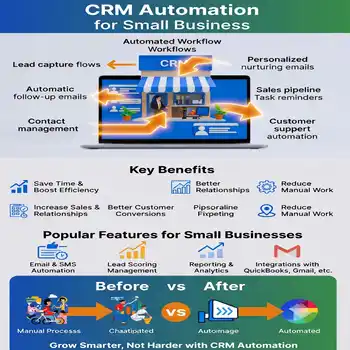
CRM automation means your contact records, deal stages, tags, tasks, and sequences update themselves based on what leads do — not based on what you remember to enter manually.
A lead submits a form → they’re created in the CRM, tagged by source and service interest, and dropped into the right nurture sequence. They open an email and click your pricing page → their lead score increases and a task fires to follow up personally. They go 14 days without opening anything → they’re tagged “cold” and moved to a re-engagement sequence. You didn’t touch any of it.
What to Set Up First
Step 1 — Tag Structure
Before you build any automation, define your tag taxonomy. Tags are how every automation knows what to do with a contact. Without a clean tag structure, you get chaos.
Minimum viable tag set:
- Source tags: Google-Ads, Organic-SEO, Referral, Social, Direct
- Service tags: Lead-Gen, Maintenance, Redesign, SEO, Automation
- Status tags: New-Lead, Active-Sequence, Hot-Lead, Cold-Lead, Client, Churned
- Action tags: Booked-Call, Proposal-Sent, Pilot-Active
In Brevo: these are contact attributes and list segments. In FluentCRM: these are tags. Build the list before you build a single automation.
Step 2 — Form-to-CRM Connection
Every form on every page should fire two things on submission: create or update a CRM contact, and apply the right tags automatically. This is the foundation everything else builds on.
WPForms → Brevo: use the Brevo addon or Zapier to connect form fields to contact attributes and apply tags on submission. FluentForms → FluentCRM: native integration, configure under form settings.
Test every form. Submit a test lead. Verify the contact appears in the CRM with the correct tags within 60 seconds.
Step 3 — Pipeline Stage Automation
Define your pipeline stages and the trigger that moves a contact through each one automatically:
- New Lead → Active (trigger: form submission)
- Active → Engaged (trigger: 3+ email opens or link click)
- Engaged → Hot (trigger: pricing page visit or reply to email)
- Hot → Call Booked (trigger: calendar booking)
- Call Booked → Proposal Sent (trigger: manual — this one still needs you)
- Proposal Sent → Client (trigger: payment received)
Most of these stages can move automatically. The only manual stage is Proposal → Client because a human should close that deal.
Step 4 — Follow-Up Task Automation
When a lead hits “Hot” status, a task should fire automatically to follow up personally within 24 hours. Don’t rely on memory. The CRM creates the task, sets the due date, and assigns it to you. You just work the task queue.
In FluentCRM: use Action → Create Task in the automation builder. In Brevo: use the task feature under deals if you’re on a paid plan, or fire a notification email to yourself.
Step 5 — Cold Lead Re-engagement
Any lead that goes 14 days without opening an email should get tagged “cold” automatically and moved to a re-engagement sequence. Don’t let dead leads sit in your active pipeline polluting your metrics.
Re-engagement sequence: 2 emails, different angle than the original sequence, 3-day gap. If no open after both — tag as “Dormant” and remove from active sequences. Reactivate quarterly with a broadcast.
The Most Common CRM Automation Mistakes
- Building automations before defining tags — results in contacts with conflicting or duplicate tags that break sequence logic
- Not testing form-to-CRM connections before going live — leads get lost and nobody knows
- Over-engineering the pipeline — 8 stages nobody maintains beats 3 automated stages every time
- No re-engagement workflow — cold leads pile up and make pipeline metrics meaningless
Start Small, Add Complexity
Week 1: tag structure + form connections. Week 2: email sequence triggers. Week 3: hot lead task automation. Week 4: cold lead re-engagement. Don’t build all of it at once. Build, test, confirm it works, then add the next layer.
Need this built for your business? Book a free Automation Audit →
CRM Automation Small Business
What is CRM automation for small business?
CRM automation for small business means your contact records, deal stages, follow-up tasks, and email sequences update automatically based on lead behavior — without manual data entry. When a lead submits a form, the CRM creates their contact, applies tags, and triggers the right sequence. You focus on closing, not admin.
What should I set up first in my CRM automation?
Start with your tag structure before building any automation. Tags are the logic layer — every trigger, sequence, and pipeline move depends on them being clean and consistent. Once tags are defined, connect your forms to the CRM and verify every submission creates a contact with the correct tags within 60 seconds.
Which CRM platforms work best for small business automation?
FluentCRM (WordPress-native, one-time fee) and Brevo (free tier up to 2,000 contacts) are the strongest options for small businesses that want automation without enterprise pricing. Both support tag-based segmentation, email sequences, and form integrations out of the box.
How long does it take to set up CRM automation for a small business?
A functional baseline — tag structure, form connections, and a 3-email welcome sequence — takes 1 to 2 weeks if you build it in layers. Week 1: tags and form integrations. Week 2: email sequence triggers and hot lead task automation. Don’t build everything at once. Build, test, confirm it works, then add the next layer.
What happens to leads that go cold in a CRM automation system?
Any lead that goes 14 days without opening an email should be automatically tagged “cold” and moved to a re-engagement sequence — 2 emails, different angle, 3-day gap. If there’s still no response, tag them “Dormant” and remove them from active sequences. Reactivate with a broadcast quarterly. Cold leads polluting your active pipeline make your metrics meaningless.
Also can check Our AI blog->